Tool
Agent 与大模型的一大区别在于能够使用外部工具拓展模型能力。在获取到每一步子任务的工作后,Agent 都会判断是否需要通过调用外部工具来完成该子任务,并在完成后获取该外部工具返回的信息提供给 LLM,进行下一步子任务的工作。
Function Calling 详解
基本概念
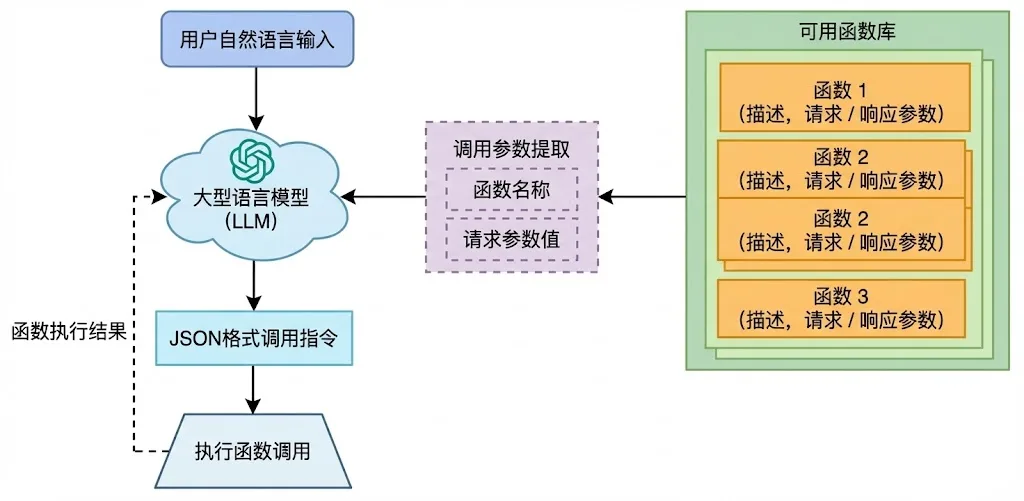
Function Call 是一种实现大型语言模型连接外部工具的机制。通过 API 调用 LLM 时,调用方可以描述函数,包括函数的功能描述、请求参数说明、响应参数说明,让 LLM 根据用户的输入,合适地选择调用哪个函数,同时理解用户的自然语言,并转换为调用函数的请求参数(通过 JSON 格式返回)。调用方使用 LLM 返回的函数名称和参数,调用函数并得到响应。最后,如果需要,把函数的响应传给 LLM,让 LLM 组织成自然语言回复用户。
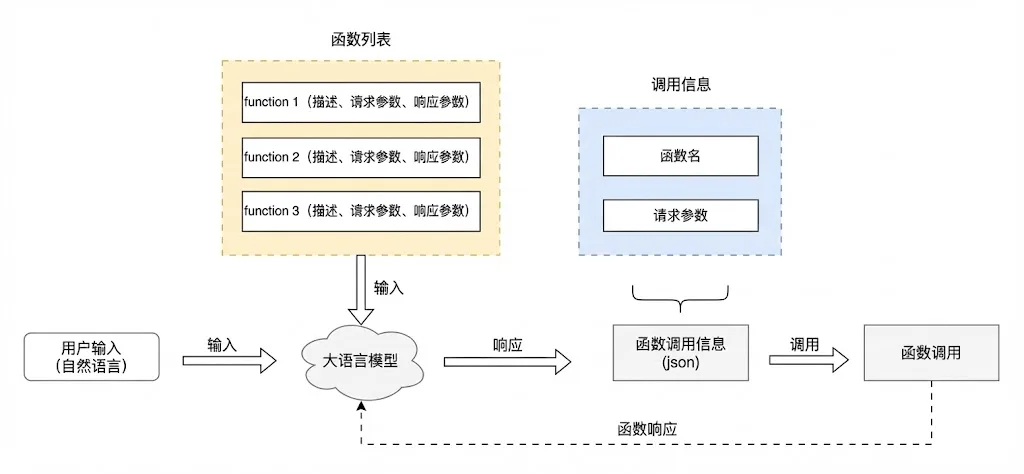
Function Calling 工作流程
- 定义工具:使用JSON Schema格式描述可用的函数
- 用户输入:用户向LLM发送自然语言请求
- LLM决策:LLM分析用户意图,决定是否需要调用工具
- 生成调用:如果需要工具,LLM生成结构化的函数调用请求
- 执行函数:外部系统执行函数并返回结果
- 整合响应:LLM将函数结果整合到自然语言响应中
工具定义规范
工具定义遵循JSON Schema规范,包含以下关键字段:
{
  "type": "function",
  "function": {
    "name": "get_weather",
    "description": "查询指定城市的天气信息",
    "parameters": {
      "type": "object",
      "properties": {
        "city": {
          "type": "string",
          "description": "城市名称,如'北京'"
        },
        "unit": {
          "type": "string",
          "enum": ["celsius", "fahrenheit"],
          "description": "温度单位"
        }
      },
      "required": ["city"]
    }
  }
}字段说明:
- name:函数名称,LLM通过此名称调用函数
- description:函数功能描述,帮助LLM理解何时使用此函数
- parameters:参数定义,包括类型、描述、是否必填等
- required:必填参数列表
多工具调用示例
from openai import OpenAI

client = OpenAI()

# 定义多个工具
tools = [
    {
        "type": "function",
        "function": {
            "name": "get_weather",
            "description": "获取指定城市的天气信息",
            "parameters": {
                "type": "object",
                "properties": {
                    "city": {"type": "string", "description": "城市名称"}
                },
                "required": ["city"]
            }
        }
    },
    {
        "type": "function",
        "function": {
            "name": "get_stock_price",
            "description": "获取股票价格",
            "parameters": {
                "type": "object",
                "properties": {
                    "symbol": {"type": "string", "description": "股票代码"}
                },
                "required": ["symbol"]
            }
        }
    }
]

# 调用LLM
response = client.chat.completions.create(
    model="gpt-4",
    messages=[{"role": "user", "content": "北京今天天气怎么样?"}],
    tools=tools
)

# 处理工具调用
if response.choices[0].message.tool_calls:
    tool_call = response.choices[0].message.tool_calls[0]
    # 执行工具并返回结果
工具注册机制
工具注册架构
工具注册是Agent系统的核心组件,负责管理所有可用工具的元数据和调用接口。
┌─────────────────────────────────────────────────────────┐
│                   工具注册中心                           │
│  ┌─────────────┐  ┌─────────────┐  ┌─────────────┐     │
│  │  工具元数据  │  │  调用接口   │  │  权限控制   │     │
│  │  (JSON Schema)│  │  (API/本地) │  │  (认证授权) │     │
│  └─────────────┘  └─────────────┘  └─────────────┘     │
└───────────────────────┬─────────────────────────────────┘
                        │
        ┌───────────────┼───────────────┐
        ↓               ↓               ↓
┌───────────────┐ ┌───────────────┐ ┌───────────────┐
│   天气工具    │ │   搜索工具    │ │   数据库工具  │
│   (API调用)   │ │   (本地执行)  │ │   (连接池)    │
└───────────────┘ └───────────────┘ └─────────────┘
工具注册实现
from typing import Dict, Any, Callable
import json

class ToolRegistry:
    """工具注册中心,管理所有可用工具"""

    def __init__(self):
        self._tools: Dict[str, Dict[str, Any]] = {}
        self._handlers: Dict[str, Callable] = {}

    def register(self, name: str, description: str,
                 parameters: dict, handler: Callable):
        """注册新工具"""
        self._tools[name] = {
            "name": name,
            "description": description,
            "parameters": parameters
        }
        self._handlers[name] = handler

    def get_tools_schema(self) -> list:
        """获取所有工具的JSON Schema"""
        return [
            {
                "type": "function",
                "function": tool
            }
            for tool in self._tools.values()
        ]

    def execute(self, name: str, arguments: dict) -> Any:
        """执行工具调用"""
        if name not in self._handlers:
            raise ValueError(f"Tool {name} not found")
        return self._handlers[name](**arguments)

# 使用示例
registry = ToolRegistry()

# 注册天气查询工具
def get_weather(city: str, unit: str = "celsius") -> dict:
    """获取城市天气信息"""
    # 实际实现中会调用天气API
    return {"city": city, "temperature": 25, "unit": unit}

registry.register(
    name="get_weather",
    description="查询指定城市的天气信息",
    parameters={
        "type": "object",
        "properties": {
            "city": {"type": "string", "description": "城市名称"},
            "unit": {"type": "string", "enum": ["celsius", "fahrenheit"]}
        },
        "required": ["city"]
    },
    handler=get_weather
)
动态工具发现
动态工具发现允许Agent在运行时发现和加载新工具:
class DynamicToolDiscovery:
    """动态工具发现机制"""

    def __init__(self):
        self.discovered_tools = {}

    def discover_from_module(self, module_path: str):
        """从Python模块发现工具"""
        import importlib
        module = importlib.import_module(module_path)

        for attr_name in dir(module):
            attr = getattr(module, attr_name)
            if callable(attr) and hasattr(attr, 'tool_metadata'):
                self.discovered_tools[attr_name] = {
                    "handler": attr,
                    "metadata": attr.tool_metadata
                }

    def discover_from_api(self, api_spec_url: str):
        """从API规范发现工具(如OpenAPI/Swagger)"""
        import requests
        spec = requests.get(api_spec_url).json()

        for path, methods in spec.get("paths", {}).items():
            for method, details in methods.items():
                tool_name = f"{method}_{path.replace('/', '_')}"
                self.discovered_tools[tool_name] = {
                    "method": method.upper(),
                    "url": path,
                    "parameters": details.get("parameters", [])
                }
MRKL(Modular Reasoning, Knowledge and Language)
MRKL即模块化推理、知识和语言系统,是一种旨在改进现有大规模语言模型的自主代理的架构。MRKL系统旨在包含一系列"专家"模块,而LLM作为路由器,将查询引导至最合适的专家模块。这些专家模块既可以是大模型,也可以是符号的(例如数学计算器、货币转换器、天气API)。
MRKL 提供一个 Prompt 模板,其中包括:
工具列表:每个工具的功能描述。
主要指令:告诉 LLM "你可以思考后调用工具,拿到结果后继续思考"。
对话或任务上下文:让 LLM 结合上下文做决策。
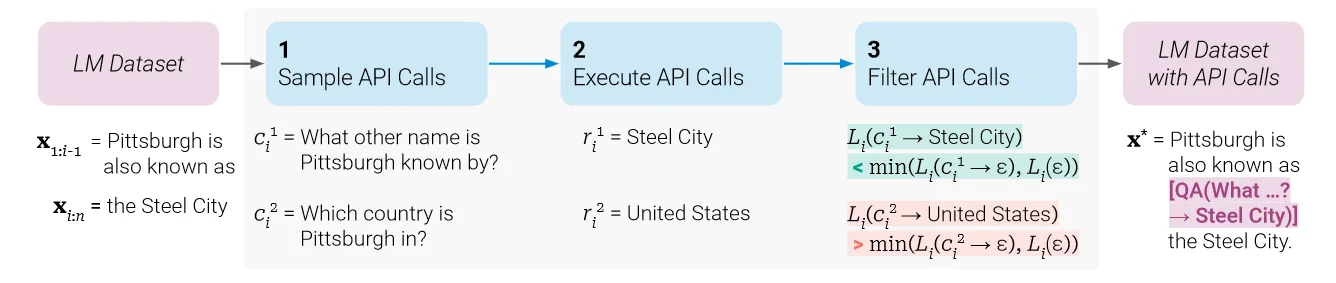
Toolformer
训练了一个用于决定何时调用哪些API、传递什么参数以及如何最佳地将结果进行分析的大模型。这一过程通过微调的方法来训练大模型,仅需要每个API几个示例即可, 训练所用的数据集根据新增的 API 调用注释是否能够提高模型输出的质量而进行扩展。该工作集成了一系列工具,包括计算器、问答系统、搜索引擎、翻译系统和日历。
HuggingGPT
HuggingGPT是由大型语言模型(LLM)驱动的,设计用来自主处理一系列复杂的人工智能任务。HuggingGPT融合了ChatGPT与HuggingFace。具体来说,LLM在这里扮演着大脑的角色,一方面根据用户请求拆解任务,另一方面依据任务描述选择适合的模型执行任务。通过执行这些模型并将结果整合到计划的任务中,HuggingGPT能自主完成复杂的用户请求。下图展示了从任务规划到模型选择,再到任务执行,最后是响应生成的完整流程:
首先,HuggingGPT利用ChatGPT分析用户的请求以理解他们的意图,并将其分解为可能的解决方案。
接下来,它会选择Hugging Face上托管的、最适合执行这些任务的专家模型。每个选定的模型被调用并执行,其结果将反馈给ChatGPT。
最终,ChatGPT将所有模型的预测结果集成起来,为用户生成响应。
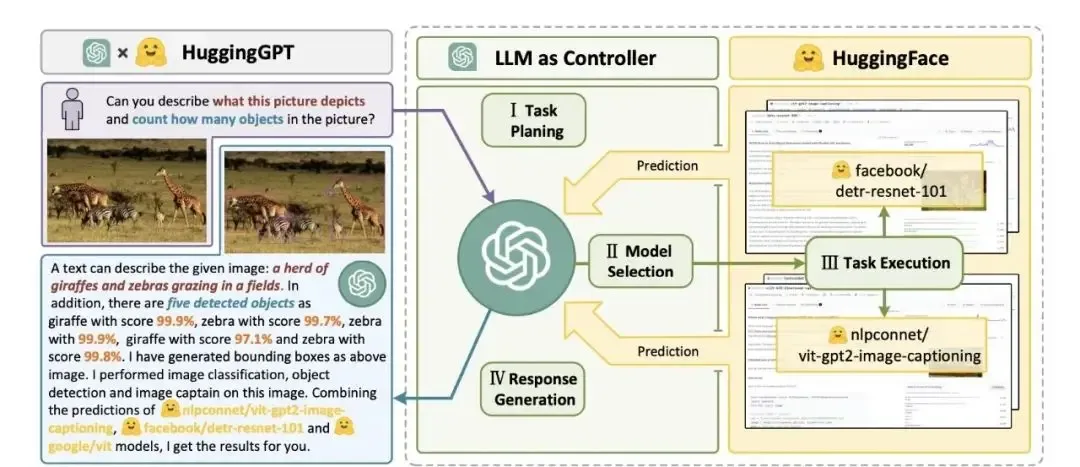
HuggingGPT的这种工作方式不仅扩展了传统单一模式处理的能力,而且通过其智能的模型选择和任务执行机制,在跨领域任务中提供了高效、准确的解决方案。从本质上来说,HuggingGPT是一个使用ChatGPT作为任务规划器的框架,ChatGPT 可根据模型的描述选择 HuggingFace 平台中可用的模型,使其能够处理来自不同模态的输入,并根据执行结果总结响应结果。
MCP 协议详解
MCP 概述
MCP(Model Context Protocol,模型上下文协议)是Anthropic推出的标准化协议,旨在解决Agent开发中工具调用的碎片化问题。MCP通过统一的规范,让不同的工具提供商和模型提供商能够无缝对接。
MCP 核心概念
- MCP Client(客户端):大模型运行环境,负责发起工具调用请求
- MCP Server(服务器):工具运行环境,提供具体的工具实现
- 传输层:支持stdio(本地通信)和HTTP+SSE(远程通信)两种模式
MCP 优势
- 复用性:一次开发,多处使用
- 标准化:统一的接口规范
- 生态丰富:社区贡献大量现成的MCP服务器
- 安全性:标准化的认证和授权机制
MCP 服务器开发示例
from mcp.server.fastmcp import FastMCP

# 创建MCP服务器实例
mcp = FastMCP("Demo")

# 注册工具
@mcp.tool()
def add(a: int, b: int) -> int:
    """两数相加"""
    return a + b

# 注册资源
@mcp.resource("greeting://{name}")
def get_greeting(name: str) -> str:
    """获取个性化问候"""
    return f"Hello, {name}!"

# 注册提示模板
@mcp.prompt()
def review_code(code: str) -> str:
    """代码审查提示模板"""
    return f"请审查以下代码:\n{code}"
MCP 客户端开发
import asyncio
from mcp import ClientSession, StdioServerParameters
from mcp.client.stdio import stdio_client

async def main():
    # 配置服务器参数
    server_params = StdioServerParameters(
        command="python",
        args=["server.py"],
        env=None
    )

    # 连接到MCP服务器
    async with stdio_client(server_params) as (read, write):
        async with ClientSession(read, write) as session:
            # 初始化会话
            await session.initialize()

            # 列出可用工具
            tools = await session.list_tools()
            print("可用工具:", [tool.name for tool in tools.tools])

            # 调用工具
            result = await session.call_tool(
                "add",
                arguments={"a": 1, "b": 2}
            )
            print("结果:", result.content[0].text)

asyncio.run(main())
工具调用最佳实践
1. 工具设计原则
- 单一职责:每个工具只做一件事
- 清晰描述:工具描述要准确无歧义
- 参数验证:严格验证输入参数
- 错误处理:提供清晰的错误信息
2. 工具安全考虑
- 输入验证:防止注入攻击
- 权限控制:限制工具访问范围
- 日志记录:记录所有工具调用
- 沙箱执行:高风险工具在沙箱中运行
3. 工具性能优化
- 缓存机制:缓存频繁调用的结果
- 异步执行:长时间运行的工具使用异步
- 并发控制:限制并发调用数量
- 超时设置:设置合理的超时时间
总结
工具调用是Agent系统的核心能力,从Function Calling到MCP协议,工具调用机制不断演进。掌握工具注册、调用和管理的最佳实践,是构建可靠Agent系统的关键。